
Private photo service, not a government office. We make the photo only.
I-485, work permit and travel permit
Green Card Photo Online for USCIS
The 2 x 2 photo for the USCIS forms that still ask for one
The green card application (I-485), work permit (I-765), travel permit (I-131) and spouse or fiancé(e) petitions (I-130, I-129F) still ask for two 2 x 2 photos. Take yours as a selfie and get the file and the prints, checked before you pay.
 Every requirementverified before you pay
 Two identical printsfor a paper filing
 Double your money backif USCIS asks for a new photo

Your photo is deleted 30 days after delivery and never used to train AI.

Language
Changes the words on the site
Country and currency
Changes the prices you pay
 2 inches51 mm
1 to 1 3/8 in25 to 35 mmHead heightchin to top of head
2 inches51 mm
2 inches51 mm
1 to 1 3/8 in25 to 35 mmHead heightchin to top of headPhoto requirements
Green Card Photo Size and Requirements
When a USCIS form asks for photos, it uses the 2 x 2 passport standard, and the photo must be recent. We check every rule before you pay.
| Size | 2 x 2 in (51 x 51 mm) |
|---|---|
| Head height | 1 to 1 3/8 in (25 to 35 mm), chin to top of head |
| Background | Plain white or off white, no shadows |
| Taken within | Recently, as your form says (Form I-130: within 30 days of filing) |
| Expression | Neutral or a natural smile, mouth closed |
| Glasses | None |
| Paper filing | Two identical prints |
| Our digital file | Square JPEG, included with every order |
Sources: U.S. Passport Photos, travel.state.gov, Form I-485 instructions, uscis.gov, Form I-765 instructions, uscis.gov and USCIS photo policy alert, 12 Dec 2025. Always check the photo section of your own form's instructions.
How it works
Your green card photo in 3 steps
Guided by the camera, measured by the software, checked before you pay.
Take a selfie or upload a photo
Take a selfie at arm's length and the camera guides you on distance, tilt and light. Or upload a recent photo.
We crop it and check it
The AI crops it to 2 x 2 inches, sizes your head, sets a plain white background and checks every requirement.
File it
The file and the print sheet are in your inbox within minutes, as soon as the final automated check passes. Mailed prints arrive in 3 to 5 business days, or 1 to 2 with Express. Or print the sheet yourself at a store near you.
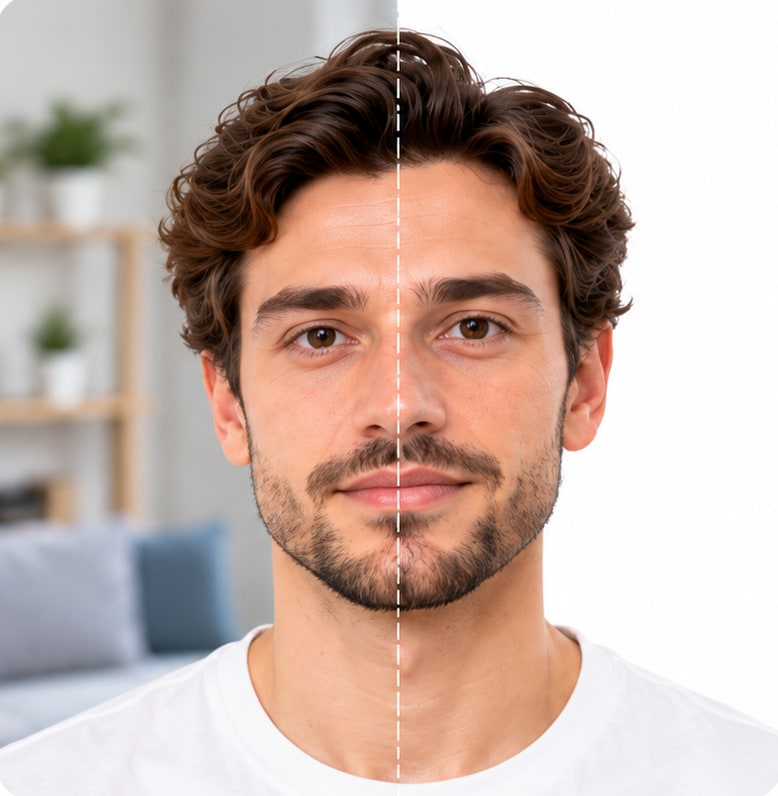
- Correct size
- Head height in range
- Plain white background
- Even lighting, no shadows
- Eyes open, mouth closed
- Ready to submit
Three tips before you take the photo
Get these three right and the software handles the rest.

Take It As A Selfie
Hold your phone at arm's length, 16 to 20 inches (40 to 50 cm) from your face. The guide sets the distance.

Face The Camera
Hold the camera at face height. Keep your head straight and your expression neutral.

Ensure Even Lighting
Stand facing a light source, such as an exposed window. Don't worry about the background.


Why customers choose PassportPhotos
Fast, guided, and backed by our acceptance guarantee.
-
Three minutes of your time
Take the photo, watch the initial check pass, pay once. No account, no appointment, no line at a counter.

-
Guided, then checked
The camera guides you while you take it. Software does the crop, the background and the measurements, then verifies the result against the official requirements before you pay.

-
Double your money back
Add the Acceptance guarantee at checkout. If USCIS returns your filing or asks for a new photo because of ours, you get twice what you paid, to the card you used.


Double your money back
Every photo gets two automated checks: one while you take it, before you pay, and a final check of the finished photo before we release it. Add the Acceptance guarantee at checkout for $6.99 and that final check is stricter. If USCIS returns your filing or sends a request because of the photo, email us within 14 days and you get twice what you paid.
What USCIS wants, in plain words
The requirements are the ones you would expect from a passport photo, with one difference: the photo has to be more recent.

Size
2 x 2 inches, in color, head between 1 and 1 3/8 inches from chin to top of head, centered, the whole head in the frame.

Background
Plain white or off white, no shadows or pattern.

Recent
USCIS asks for photos taken recently, and the Form I-130 instructions say within 30 days of filing. Read the photo section of your form's instructions, and take a new photo for each filing. Since December 2025 USCIS takes the photo for your green card, work permit card and citizenship certificate itself at your biometrics appointment, so the photos you send go in your file, not on the card.

Pose And Expression
Face the camera straight on, neutral expression or a natural smile, mouth closed, both eyes open.

Glasses And Coverings
No glasses. No hat or head covering unless worn daily for religious or medical reasons, with the full face visible.
Paper Filings
Two identical prints, with your name and A-Number, if you have one, written lightly in pencil or felt pen on the back.

The software measures the size, the background, the pose, the expression, glasses and the light before you pay. It cannot see when the photo was taken, so take it when you are ready to file.
Which USCIS forms still ask for photos
These forms still ask you to send photos, according to their current instructions on uscis.gov. Check the photo section of your own form before you file.

Green Card
The green card application (I-485). Its instructions still ask for two photos.
Spouse And Fiancé(e)
The spouse petition (I-130) and the fiancé(e) petition (I-129F) ask for photos of you and your partner, taken within 30 days of filing.
Work Permit
The work permit application (I-765) asks for two photos.

Travel Permit
Advance parole or TPS travel filed in the US, and a refugee travel document filed from abroad (I-131). A reentry permit needs no photo.

Filing From Abroad
If you live outside the US: citizenship (N-400), a certificate of citizenship (N-600), a replacement certificate (N-565), or removing conditions while on military or government orders abroad (I-751).

No Photo Needed
Green card renewal or replacement (I-90), citizenship filed from inside the US (N-400), DACA, TPS and asylum. USCIS takes your picture at the biometrics appointment.
Green Card Photo Price
| Digital photo | $16.99 |
|---|---|
| Digital photo plus two printed photosFour or six prints cost a little more | $19.99 |
| Standard shipping for mailed prints3 to 5 business days | Free |
| Express shipping for mailed prints1 to 2 business days | $15 |
| Print at a store near youYou order it from the emailed sheet | Store print price |
| Acceptance guaranteeOptional, added at checkout | +$6.99 |
| Photo retouchingOptional, added at checkout | +$4.99 |
Tax is included in the total you see. You pay once, after the initial check has passed, and never before.
Why photos get rejected, and how we catch it
The State Department publishes its own examples of rejected photos:
- head too small or too large
- shadows across the face
- a colored or patterned background
- glasses, eyes closed, mouth open or head tilted
- a photo older than six months
Our software measures the head size, the tilt, the light and the background against the State Department's own requirements, and shows you every result before you pay. A photo that fails a check cannot be bought; you retake it, free, until it passes. That matters, because a rejection costs you weeks.
What we do not do to your photo
We crop it, size it, place your head correctly and put it on plain white. We do not change your face, your features, your eyes or your expression. A photo that looks like you is the whole point.
If you add photo retouching, we remove temporary blemishes, shadows under the eyes, stray hairs and dust spots, and nothing else.
Sources: U.S. Passport Photos, travel.state.gov, Form I-485 instructions, uscis.gov, Form I-765 instructions, uscis.gov and USCIS photo policy alert, 12 Dec 2025. Always check the photo section of your own form's instructions.
FAQ
Green Card Photo Questions, Answered
PassportPhotos.com is a private online photo service that makes 2 x 2 inch photos for the green card and other USCIS forms. We are not part of USCIS or any government office.
Is a green card photo the same as a passport photo?
Yes, a green card photo has the same size and requirements as a US passport photo: 2 x 2 inches with the head 1 to 1 3/8 inches tall. The difference is timing: USCIS asks for a photo taken recently, and Form I-130 says within 30 days of filing. Since December 2025 USCIS takes the photo printed on your green card itself, at your biometrics appointment. The photos you send are for your filing.Does USCIS still accept photos I send?
Since 12 December 2025 USCIS takes the photo for your green card, work permit card and citizenship certificate itself, at your biometrics appointment. The instructions for the I-485, I-765, I-131, I-130 and I-129F still ask you to send two photos with your filing, so follow your form's instructions.Can I take my green card photo as a selfie?
Yes, you can take your green card photo as a selfie, and it is the easiest way. Hold your phone at arm's length, 16 to 20 inches from your face, and the camera guide sets the distance and framing. The software then checks every requirement before you pay. Prefer a helper or the timer? That works too.Which file do I use if I file online?
If your form asks for photos, USCIS lets online filers add a scan or a phone picture of them. You can use the JPEG we email you within minutes of paying, once the final automated check passes. The 4 x 6 sheet is for printing.How many prints do I need for a paper filing?
Two identical photos for most forms, and the 4 x 6 sheet carries exactly two. Write your name and A-Number lightly on the back of each in pencil or felt pen.Can I reuse my passport photo for a green card application?
Only if it is recent. USCIS asks for photos taken recently, and Form I-130 says within 30 days of filing. A passport photo from last year is too old, so take a new one.Can I wear glasses in a green card photo?
No, glasses are not allowed in a green card photo, so take them off.Do I need a photo for green card renewal (I-90) or citizenship (N-400)?
Not if you live in the US. USCIS takes a new photo at your biometrics appointment for both. If you file the N-400 from outside the US, its instructions ask for two 2 x 2 photos, and ours meet them.Does the guarantee cover a photo problem with USCIS?
Yes, with the Acceptance guarantee. If USCIS returns your filing or sends you a request because of the photo, send us the notice within 14 days and you get double your money back. USCIS takes the picture on your card itself, so the guarantee covers the photos you send with your forms.What happens to my photo afterward?
Used to make your photo and for nothing else. Deleted 30 days after delivery, never used to train AI.
Get started
Choose your document
We make compliant photos for official IDs from all over the world. We do not provide or issue the documents themselves.


